Book My Luck
Hanging Charm on Mac Screen: How It Works

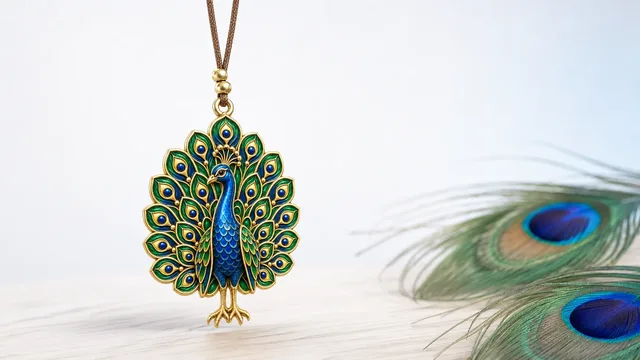
A hanging charm on your Mac screen is a small lucky charm that dangles from the top edge on a thin cord, swaying with real rope physics and reacting to your cursor. It sits above your work like a charm hung from a rear-view mirror, and everything beneath it clicks straight through, so it never blocks a window or a button.
Most people picture a static sticker when they hear this. The point of a hanging charm is that it moves and feels physical, which is what makes it read as present rather than as decoration.
How does the hanging charm on your Mac screen move?
The charm attaches to the top edge of your screen on a thin cord, the way you might hang a charm in a car or a doorway. From there it behaves like a real object on a string.
It sways when you move the window beneath it, drifts back to rest, and responds when your cursor comes near. You can grab it and give it a flick, and it swings the way a real charm would before slowly settling.
That physical quality is the whole idea. A moving object at the edge of your vision registers as alive in a way a flat image never does, which is why it works as a small companion rather than wallpaper.
The motion is driven by rope physics rather than a fixed animation, so no two swings are quite the same. That small unpredictability is part of what stops it from feeling like a looping graphic you tune out.
The cord is not just decoration either. Because the charm hangs from a simulated string, it responds to the momentum of a flick and to the drift of the window beneath it, the way a charm hung from a mirror catches the sway of the car. It is a small piece of the physical world borrowed onto the screen, and that borrowing is what makes people reach out and flick it in the first place, the same instinct that makes you tap a hanging ornament as you pass.
Only one charm hangs per screen. On a Mac with several displays, each screen gets its own charm, so the effect is consistent wherever you are looking.
Won't a charm on screen block my clicks?
This is the first worry everyone has, and the answer is no. The charm is drawn as an overlay that passes your clicks through to whatever is underneath it.
If a button, link, or text field sits behind the charm, you click it exactly as if the charm were not there. The charm catches your cursor only when you deliberately reach out to grab and flick it.
This click-through behaviour is a specific, well-understood technique on macOS, explained in click-through overlays on Mac. It is what separates a charm that lives happily above your work from an overlay that fights you.
Because of it, you can leave the charm on over everything and still work at full speed. The overlay is seen but not felt, which is exactly the balance a screen companion needs to survive past the first hour.
Click-through is the feature that makes an on-screen charm practical. Without it, a charm would be a novelty you disable within an hour. With it, you forget it is technically on top of everything.
What can you do with a hanging charm?
A hanging charm on your Mac screen is built to do more than look pleasant; it is made to mark moments. You can leave it hanging as a quiet presence, or give it a job tied to your day.
There are three placement modes so it fits how you work. Over everything keeps it always visible; behind windows tucks it under your apps so you glimpse it only when the desktop shows; and hidden puts it away entirely without quitting.
| Mode | Where the charm sits | Best for |
|---|---|---|
| Over everything | Above all windows | A constant, gentle presence |
| Behind windows | Under your apps | Seeing it only at the edges |
| Hidden | Not shown | Deep-focus stretches |
That range of modes is why the charm suits different temperaments. Someone who likes company keeps it over everything; someone who wants it mostly out of sight uses behind windows and lets it surface between tasks.
You can also reach the charm from the keyboard. A toggle hotkey shows or hides it in an instant, so switching modes never means hunting through a menu when you are mid-task.
The horseshoe is a classic for a reason. In Europe and the Americas it is hung points up, so the luck is said to collect in the cup rather than spill out, and it is a fitting first charm for a screen edge.
Whatever you pick, keep the honest framing in mind. A charm is a charm, not a promise; it marks a moment and steadies you the way a pre-game ritual does, and cultural charms are shown with respect for their real origins, never as a guarantee of any outcome.
The charm itself is run from a small menu bar app, so the controls live in the top strip rather than in a window; that pattern is covered in menu bar apps explained. To go deeper on how the dangling and click-through actually work under the hood, see what a screen dangle app is.
You open the small window once to activate and choose a charm, then close it; the charm keeps hanging on its own. From there you mostly interact through the menu bar icon or the hotkeys, and the menu bar charm guide covers those daily controls.
The best sign that it is working is that you stop noticing it, except when you want to. It sways at the edge, clicks through your work, and comes forward only for the moments you asked it to mark, which is the right amount of presence for a tool like this.
If you share your screen for calls or recordings, the modes earn their keep. Tuck the charm behind windows or hide it entirely before you present, then bring it back after, all from a single hotkey. Nothing about the charm forces itself into a screen share, which means you can enjoy it during your own work and set it aside the moment other people are looking.
One practical note for laptop users: because the charm is a small, simple overlay rather than a heavy graphic, it is designed to sit lightly on your machine while it hangs there all day. A screen companion that spun the fans would defeat its own purpose, so the point is presence without cost. You should be able to forget it is running, both because it stays out of your clicks and because it stays out of your battery.
Book My Luck, the app that hangs the charm, is a one-time purchase with no subscription. The pricing is a single payment for your Mac, and every charm and mode is included.
What is a hanging charm on a Mac screen?
It is a small lucky charm that dangles from the top edge of your screen on a thin cord with real physics. It sways, reacts to your cursor, and can be grabbed and flicked, while everything under it clicks through.
Does the charm get in the way of my work?
No. It is a click-through overlay, so your clicks pass to whatever is behind it. It only responds to the cursor when you deliberately reach out to grab and flick it.
Can I move the charm or hide it?
Yes. There are three modes: over everything, behind windows, and hidden. You can also grab and flick it whenever you like, and it settles back on its own.
What happens with more than one monitor?
Each display gets its own charm, one per screen. The effect stays consistent wherever you are working.
Does hanging a charm bring good luck?
It marks a moment and steadies you, the way a pre-game ritual or a lucky pen does. It is a charm, not a promise, and it makes no claim about outcomes.
Book My Luck today
Book My Luck is a desktop decoration for macOS 14+ and Windows 10/11. The desktop outside the charm remains clickable. The current Mac and Windows downloads are version 1.0.32, signed by KAK DIGITAL LLC. On Mac, Charm Centre controls size, cord length, placement, displays and motion. Collections and controls can differ between Mac and Windows.
There is no calendar integration, booked-moment scheduler or native-app free trial. Explore the website demo and regional pricing. One key activates one computer at a time; activation and license refresh require internet. Preferences are local, but purchasing, activation and website analytics use online services described in the privacy policy.
Hang one for the moment that matters
Book My Luck hangs a rendered charm from your Mac or Windows screen, with rope physics and manual interaction. Check the current platform release and regional price before buying.
Get Book My Luck →