Book My Luck
Screen Dangle App: What It Is and How It Works

A screen dangle app is a small Mac program that hangs an object from the top edge of your display on a thin cord, letting it sway with real physics while your clicks pass straight through it. It is the software version of a charm hung from a mirror or a doorway, sitting above your work without ever getting in its way.
The name sounds odd until you see one move. The dangle is the whole trick: an object on a string that behaves like a real thing, not a static picture stuck to your screen.
What does a screen dangle app actually do?
At its simplest, it draws an object that hangs from the top of your screen and obeys gravity and momentum. The cord flexes, the object swings, and it drifts back to rest the way a real pendant would.
Two behaviours make it feel physical rather than animated. It reacts to your cursor when you come near, and you can grab it and give it a flick so it swings for real before settling.
The second, quieter behaviour is what makes it usable: it clicks through. Anything beneath the dangling object receives your clicks normally, so the app can float above everything and still leave your work untouched.
Put those together and you have something rare: an on-screen element that is lively and interactive on purpose, yet completely passive when you are not thinking about it.
The category is easy to confuse with a few others, so it helps to be precise. It is not a screensaver, which takes over when you step away; the dangle is there while you work. It is not a wallpaper, which sits behind everything; the dangle sits in front and clicks through. And it is not a widget, which shows you data; the dangle shows you an object with weight and motion. What it borrows from all three is the sense of something present without demanding a window of its own.
A dangle app is defined by two things at once: an object that moves like a physical pendant, and a surface that your clicks pass through. Take away either and it stops being useful.
How does it click through your windows?
This is the part that makes people trust it. The dangling object is drawn on a transparent overlay that is set to ignore mouse events, so the system sends your clicks to whatever window is underneath.
In practice you never notice the overlay is there. A button, link, or text field behind the object works exactly as it would with nothing on top, and the object only grabs your cursor when you deliberately reach for it.
This technique is a standard, documented part of how macOS handles overlays, explained more fully in click-through overlays on Mac. It is the same mechanism serious overlay tools use, applied to something playful.
Click-through is not a hack or a compromise. It is the intended way to draw something above your work that is meant to be seen but not interacted with by accident.
Screen dangle app versus a desktop pet
Both put something lively on your screen, but they occupy it very differently. Knowing the difference helps you pick the one that suits how you work.
A dangle app
- Where it lives: hangs from the top edge, in a fixed lane.
- How it moves: swings and settles on a cord; you can flick it.
- Distraction level: low, because it stays put.
- What it is for: marking moments and adding a calm, physical presence.
A desktop pet
- Where it lives: roams across your wallpaper.
- How it moves: walks, wanders, and reacts around the screen.
- Distraction level: higher, since it can cross your work.
- What it is for: company and play.
The dangle app trades the free roaming of a pet for staying out of the way, which many people prefer at a work machine. The full weigh-up is in desktop pet versus desktop charm.
Neither is better in the abstract. If you want a companion that moves around, a pet fits; if you want a marker that stays at the edge, a dangle app fits, and your temperament decides more than any feature list.
Why hang a charm rather than anything?
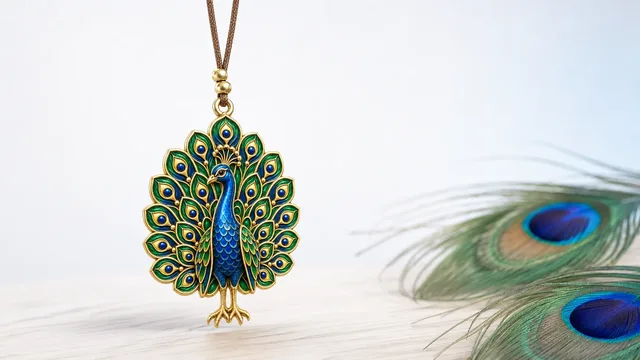
You could dangle any object, but a charm gives the dangle a meaning. That is the idea behind Book My Luck, the clearest example of the category.
Keep the honest framing in view. A charm is a charm, not a promise; it marks a moment and steadies you the way a pre-game ritual does, and it makes no claim about outcomes. Cultural charms are shown with respect for their real origins.
For the blue bead specifically, the nazar boncuğu of Turkey and the Mediterranean is the traditional guard against the evil eye, and giving it a flick is its small ritual. It is a natural choice to dangle at the top of a screen you look at all day.
Setting one up
Getting an object dangling takes a moment and then it stays out of your way. You open the app's small window once to activate and choose a charm, then close it; the object keeps hanging on its own.
From there you mostly leave it alone. It sways at the edge, reacts to your cursor, and clicks through your work, and you can grab and flick it whenever you want a small reset, much as described in hanging a charm on your Mac screen.
There are placement modes too, so the dangle can sit over everything, tuck behind your windows, or hide entirely for a deep-focus stretch. That flexibility means the same app suits someone who wants constant company and someone who wants it only at the edges.
The measure of a good dangle app is that you stop noticing it except when you want to. It is present without being demanding, which is a rare and pleasant quality in software.
It also has to earn its place on a laptop, which means running light. A dangling charm is a small overlay, not a game engine, so it is meant to hang there all day without draining the battery or spinning the fans. If a screen companion made your machine work harder just to sit still, you would turn it off within a day, so keeping it feather-light is not a nicety but the whole point.
If you present or record, the placement modes matter here too. You can tuck the dangling charm behind your windows or hide it entirely before a screen share, then bring it back with a hotkey once you are done. It stays a private pleasure rather than something your audience has to see, which is part of why it suits a work machine rather than only a personal one.
Book My Luck is a one-time purchase, no subscription. The pricing is a single payment for your Mac, and the dangling charm, its physics, and click-through are all included.
What is a screen dangle app?
It is a Mac app that hangs an object from the top edge of your screen on a cord with real physics. The object swings, reacts to your cursor, and can be flicked, while your clicks pass straight through it.
Does a screen dangle app block my clicks?
No. The object sits on a transparent, click-through overlay, so your clicks reach whatever window is underneath. It only responds when you deliberately grab it.
How is it different from a desktop pet?
A dangle app hangs from a fixed spot at the top edge and stays there, while a desktop pet roams across your wallpaper. The dangle app is less likely to distract you.
Can I flick the dangling object?
Yes. You can grab it with your cursor and give it a flick, and it swings with real momentum before settling back to rest.
Does a dangling charm bring luck?
It marks a moment and steadies you, the way a lucky pen or pre-game ritual does. It is a charm, not a promise, and it makes no claim about outcomes.
Book My Luck today
Book My Luck is a desktop decoration for macOS 14+ and Windows 10/11. The desktop outside the charm remains clickable. The current Mac and Windows downloads are version 1.0.32, signed by KAK DIGITAL LLC. On Mac, Charm Centre controls size, cord length, placement, displays and motion. Collections and controls can differ between Mac and Windows.
There is no calendar integration, booked-moment scheduler or native-app free trial. Explore the website demo and regional pricing. One key activates one computer at a time; activation and license refresh require internet. Preferences are local, but purchasing, activation and website analytics use online services described in the privacy policy.
Hang one for the moment that matters
Book My Luck hangs a rendered charm from your Mac or Windows screen, with rope physics and manual interaction. Check the current platform release and regional price before buying.
Get Book My Luck →