Book My Luck
Evil Eye Screensaver vs a Live Nazar on Screen
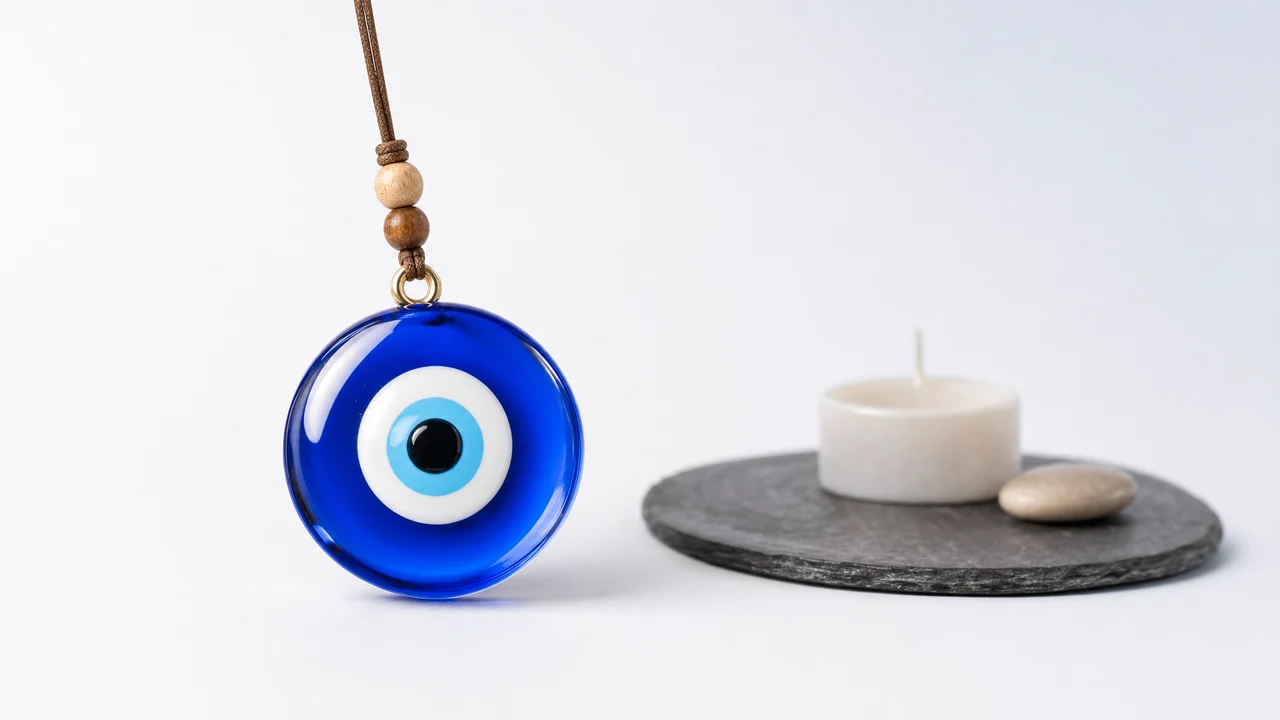
An evil eye screensaver only shows a nazar when you step away and your Mac goes idle, while a live nazar hangs from the top edge and sways the whole time you are working. A screensaver is for the moments you are gone; a charm is for the moments that matter, which is exactly when a screensaver is not on.
Most people set a screensaver expecting a companion and then never see it, because it only runs when nobody is watching.
What is an evil eye screensaver?
An evil eye screensaver is a screen that displays a nazar after your Mac has been idle for a set time. It is meant to protect the display and to look nice while you are away.
By design it appears only in your absence. The moment you touch the keyboard or mouse, it vanishes and your desktop returns.
That is the core limitation. A screensaver is present only when you are not, so it can never mark a moment while you work.
It is genuinely pleasant as idle-time decoration. Walk past your desk and see a slow nazar drifting; it just cannot be part of an interview, a deploy, or an exam that you are awake and present for.
The nazar, the blue glass evil eye from Turkey and the Mediterranean, is a real protective symbol. However you show it, on a screensaver or as a charm, it is worth treating with respect for its tradition rather than as filler.
How is a live nazar different?
A live nazar is an object that hangs on your screen while you use the Mac. It sits on a thin cord at the top edge, sways with real rope physics, and reacts when your cursor passes near.
The key difference is timing. It is present exactly when a screensaver is absent: while you are typing, thinking, and working through the moment you care about.
Because it lives in a click-through layer, it floats over your apps without covering them, and every click passes through to whatever is beneath. See how a hanging charm works for the details.
Evil eye screensaver vs a live nazar
Both put a nazar on your Mac, but at opposite times. One runs when you are away; the other runs when you are present.
Evil eye screensaver
- When it shows: only when the Mac is idle and you are away.
- Visible while you work? No.
- Reacts to you? No.
- Can mark a moment? No.
- Best for: idle-time decoration and a pleasant locked screen.
The plain takeaway: a screensaver decorates your absence, and a charm accompanies your presence. If the point is to feel the nazar during a real moment, the live version is the one that can.
Which should you choose?
Choose a screensaver if you only want something nice on an idle screen. It is a fine, low-effort touch for when you walk away.
Choose a live nazar if you want the charm present during the moments that matter. Since a screensaver is off precisely when you are working, it cannot help you the way a hanging charm can. For the still-image cousin of this question, see evil eye wallpaper versus a charm that moves.
Here is the honest line, because the nazar is about protection in folklore. A charm is a charm, not a promise; it marks a moment and steadies you the way a lucky pen or a pre-game ritual does, and it changes no outcome.
Keep both if you like. Let a screensaver handle the idle screen and a live charm handle your working hours; each covers the time the other cannot.
Do live charms use more power than a screensaver?
Not meaningfully, if the charm is well made. A screensaver actually keeps the display fully lit and animating while it runs, which is not free either.
You can confirm any such app in Activity Monitor, which shows idle CPU in about a minute. For how click-through keeps the charm from blocking your work, see screen dangle apps explained, and for where it fits among other tools, see our menu bar apps guide.
Why presence matters more than protection
The pull toward a screensaver is understandable, because it feels like the nazar is guarding your machine while you are away. In the folklore, though, the nazar watches over you, and you are most in need of steadying when you are present and under pressure, not when you have walked off for coffee.
That is the real case for a live charm. It is with you during the exam, the interview, the deploy, and the pitch, which are the moments a screensaver sleeps through entirely. Presence in the moment is the whole reason a hanging nazar can do what an idle-screen picture cannot.
Presence also builds a habit. Glance up at the nazar before you start something hard, take one breath, and begin; do that a few times and the glance becomes a small ritual that settles you on its own. A screensaver can never be part of that habit, because it is gone the instant you sit down to work.
None of this makes a screensaver useless. It simply belongs to a different time of day, and if what you actually wanted was a nazar beside you during the moments that count, the live version is the honest answer.
When the time arrives, the nazar drifts forward, performs its small ritual, and then settles back to its resting sway. You give it a flick, take a breath, and start, and the moment now has a marker it did not have before.
A screensaver cannot do any of this, because it does not know your calendar and only appears when you are gone. The live charm turns a symbol into a cue, and that is the point of hanging one where you can see it. Enjoy it as a steadying ritual, not as a shield against the outcome.
You do not need to book every moment for the charm to matter. Even at rest, a live nazar swaying at the top of the screen is a small, present reminder to slow down and breathe, which is more than an idle-time picture can offer. The scheduling is simply there for the days when a specific moment deserves to be marked, and the rest of the time the charm just keeps you gentle company while you work.
Can I get an evil eye screensaver on a Mac?
Yes. You can set a screensaver that displays a nazar when your Mac is idle, through System Settings. It looks pleasant on an unattended screen, but it only runs while you are away and disappears the moment you touch the keyboard.
Does a live nazar block my work?
No. It sits in a click-through layer, so it floats over your apps without covering them and every click passes through to the app beneath. You interact with it only when you choose to reach for it.
Will a screensaver or charm bring luck?
Neither changes outcomes. The nazar is a protective symbol in folklore, and displaying it marks a moment and steadies you the way a ritual does. Book My Luck's pricing is a one-time purchase if you want the live version, but treat it as meaning, not magic.
Book My Luck today
Book My Luck is a desktop decoration for macOS 14+ and Windows 10/11. The desktop outside the charm remains clickable. The current Mac and Windows downloads are version 1.0.32, signed by KAK DIGITAL LLC. On Mac, Charm Centre controls size, cord length, placement, displays and motion. Collections and controls can differ between Mac and Windows.
There is no calendar integration, booked-moment scheduler or native-app free trial. Explore the website demo and regional pricing. One key activates one computer at a time; activation and license refresh require internet. Preferences are local, but purchasing, activation and website analytics use online services described in the privacy policy.
Hang one for the moment that matters
Book My Luck hangs a rendered charm from your Mac or Windows screen, with rope physics and manual interaction. Check the current platform release and regional price before buying.
Get Book My Luck →